SCWebConsole 설치
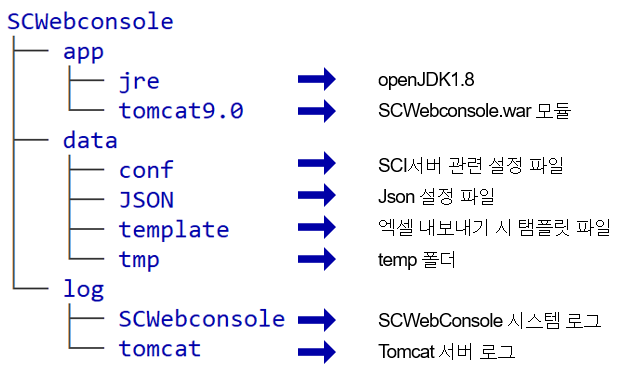
1. 설치패키지 구성
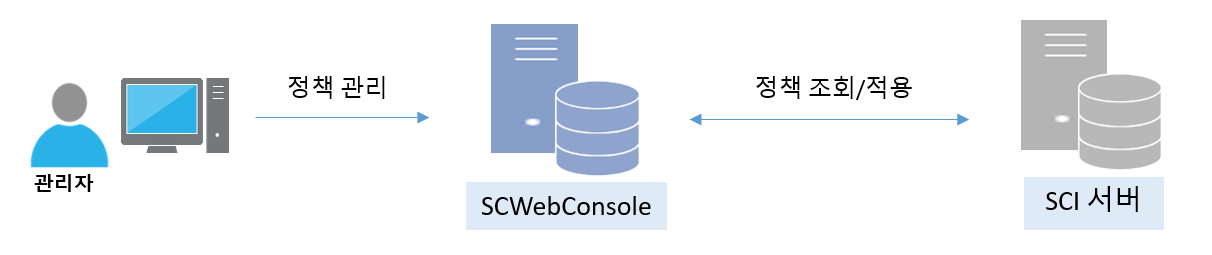
## 2. 시스템 구성
## 3. 설치 import Tabs from '@theme/Tabs'; import TabItem from '@theme/TabItem';
-
SCWebConsole 설치 경로가 "/app/Softcamp" 디렉토리라 가정 함
tar -zxvf SCWebconsole.tar.gz -C /app/Softcamp/
cd /app/Softcamp/SCWebconsole
- SCWebConsole 설치 경로가 "E:\" 폴더라 가정 함
- E:\ 경로에 SCWebconsole.zip 압축 해제
- CMD에서 SCWebconsole/package/install.bat 실행 후 설치패키지 루트 경로 입력
ex) E:\
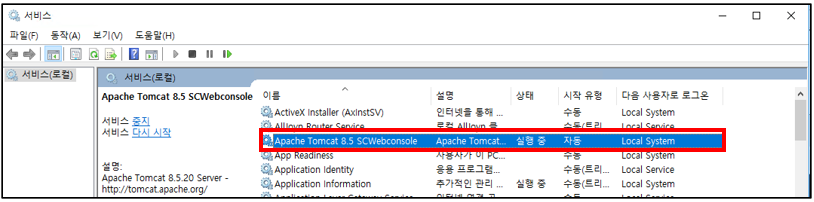
- 서비스 - Apache Tomcat 9.0 SCWebconsole이 실행됐는지 확인 후 중지
## 4. 설정 파일 수정
-
TFTDB 계정 정보 입력
$SCWebconsole/data/conf/context-datasource.xml···
<!-- Maria DB -->
<bean id="dataSource" class="org.springframework.jdbc.datasource.SimpleDriverDataSource">
<property name="driverClass" value="org.mariadb.jdbc.Driver"/>
<property name="url" value="jdbc:mariadb://127.0.0.1:3306/tftdb?allowMultiQueries=true"/>
<property name="username" value="drmadmin"/>
<property name="password" value="softcamp1!"/>
</bean>
- 웹콘솔 최고관리자 계정으로 로그인 할 IP 추가
$SCWebconsole/data/JSON/customPolicy.json
  ···
  {
    "key": "systemAccessIP",
    "value": "127.0.0.1|10.10.32.9|10.10.32.10"
  }
  ···
- 웹콘솔 접속 포트 설정
$SCWebconsole/app/tomcat9.0/conf/server.xml
    <!-- A "Connector" represents an endpoint by which requests are received
       and responses are returned. Documentation at :
       Java HTTP Connector: /docs/config/http.html
       Java AJP  Connector: /docs/config/ajp.html
       APR (HTTP/AJP) Connector: /docs/apr.html
       Define a non-SSL/TLS HTTP/1.1 Connector on port 8080
  -->
  <Connector port="8000" protocol="HTTP/1.1"
             connectionTimeout="20000"
             redirectPort="8443" URIEncoding="UTF-8"/>
  <!-- A "Connector" using the shared thread pool-->
  <!--
  <Connector executor="tomcatThreadPool"
             port="8080" protocol="HTTP/1.1"
             connectionTimeout="20000"
             redirectPort="8443"
             maxParameterCount="1000"
             />
  -->
## 5. Tomcat 서비스 시작
## 6. 웹콘솔 접속
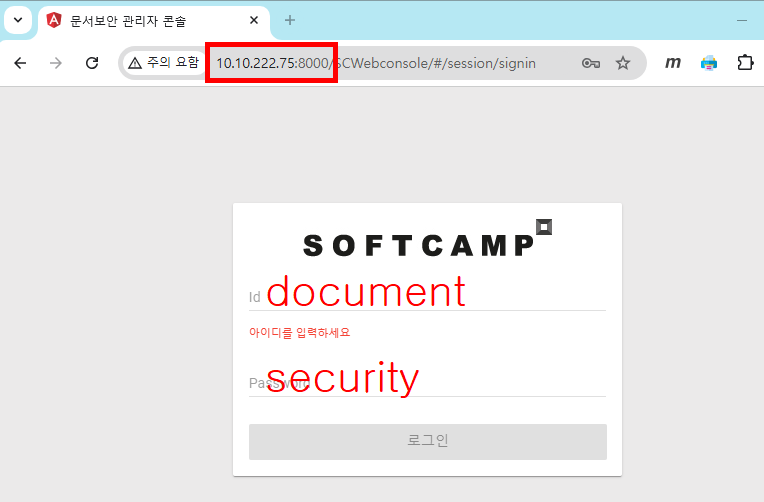
- Chrome 또는 Edge 브라우저에서 웹콘솔 접속
- 접속 url : http://서버IP:8000
- 계정(Default) ID/PW : document / security